
My Role
Lead UX/UI Designer
Platform(s)
Web (desktop & mobile app)
Timeline
Jun 2022 – Dec 2023
Team
1 Designers, 2 Developers
TL;DR
Responsibilities
Lead UX designer across all modules. Owned information architecture, interaction design, component system, and design-to-dev handoff for the full product.
Results
Shipped a complete business operating system that replaced an aging Microsoft Access setup, covering orders, accounts, billing, reps, products, piecework, reporting, and more across 12+ interconnected modules.
Highlights
Delivered a dual-sided Piecework app as the entry point to the project, which led to being trusted with the full system redesign. Built the design system from the ground up in parallel with the product, which paid off significantly in the back half of the project.
Problem & Constraints

Bucket Wonders ran its entire business on Microsoft Access: orders, billing, piecework pay, and reporting, all bolted onto a database never meant to hold a company. Reps pulled numbers by hand because the reports module couldn't be trusted.
I came on originally to build Piecework, the two-sided app that paid outside workers for finished goods. Once that shipped, the client asked me to take on the rest of the system, which meant walking into a business with no existing design foundation and over a dozen interconnected modules where a mistake in one place showed up as a problem three modules later.
Bucket Wonders had outgrown Microsoft Access.
Process & Key decisions
I treated this less like a series of features and more like an operating system for the business. The first job was understanding how work actually moved through the company, not just what buttons needed to exist.
Orders
Orders were the core of the business, so I started here. With 64 screens, two printable reports, and a notification email, this was the most complex section by a significant margin. The list view needed to surface what mattered fast: search, filter, date range, and a clear path to start a new order.


In the main view, I organized information the way an order actually progresses, account info up front, then notes, then invoice details, then products and line items, then shipping. Every decision about hierarchy came from watching how the team worked through an order start to finish.
Reps
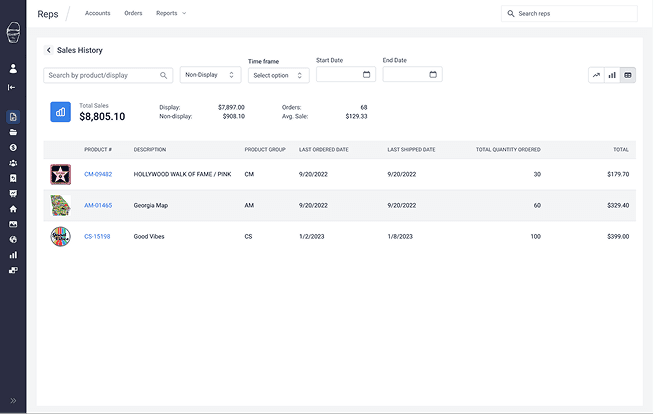
Sales reps needed one place to answer "how is this account doing" without opening three different Access queries to get there. I built the main view around a single rep's full history: accounts, displays, order activity, and payment status, with reports scoped to whatever date range a manager actually asked about. The list view got the same treatment on the way in, sortable by the fields reps checked most, so finding a rep took a search instead of a scroll.


The main view gives a full picture of accounts, displays, order history, and payment info, with reports within a specified date range. The goal was to get the full picture of each Sales Rep.


Piecework
This was the module that started everything.
Piecework is a two-sided operation: an admin coordinating jobs and pieceworkers completing them for pay. I designed two separate web apps to handle each side, because the needs were genuinely different. The admin side needed scheduling clarity, job creation, payment tracking, and more.


The pieceworker side needed to be simple enough that someone picking up a job between other commitments could get in and out fast. Job acceptance, progress updates, payment history, and availability settings all needed to be there without making the app feel like a tool built for someone else.
Design System & Components
There was no design system when this started, because there had never been a real interface to build one from. I built it alongside the product instead of trying to spec it up front, formalizing patterns as they showed up across Orders, Reps, and Piecework. Tables, forms, modals, status indicators, and printable layouts all got documented as they stabilized. By the time later modules came up, most of the foundational decisions were already made, which meant those sections moved faster and needed fewer revisions.


Final Experience
Bucket Wonders runs on a single system now instead of a database patched together over years. A rep can pull up an account, check order history, and see payment status without leaving the screen they started on. An admin can create a piecework job and a pieceworker can accept it and log progress from a phone between other jobs. Twelve modules that used to live in separate mental models now share one set of patterns, and the reporting that reps once distrusted runs off the same data as everything else.


Every part of the operation, from placing an order to paying a pieceworker to running a monthly sales report, lives in one place and behaves the way users expect. It replaced Access entirely.
Impact & Findings
Replacing Access
Replacing Access forced every workflow to get rebuilt rather than copied, which meant honest conversations about what the old system actually did well against what people had simply gotten used to. Several processes changed shape entirely in that conversation, not just the screens around them.
Designing for two audiences
Designing Piecework for two audiences in one system, an admin coordinating jobs and a pieceworker fitting the app between other commitments, forced decisions that neither group ever saw but both depended on.
A strong design system early
And building the design system in parallel with the product paid off exactly where it mattered: the later modules, built once the patterns existed, took less time and needed fewer rounds of revision than the earlier ones.