
Group decisions made easy
My Role
Lead UX/UI Designer & Front‑end Developer
Platform(s)
Web, Android, iOS
Timeline
Feb 2023 – Sep 2024
Team
2 Designers, 4 Developers
TL;DR
Responsibilities
Lead UX/UI, design system architecture, project management across two designers and four engineers.
Results
Shipped a production design system and a launched Android/iOS app, taking the product through five funded design rounds without losing scope discipline between restarts.
Highlights
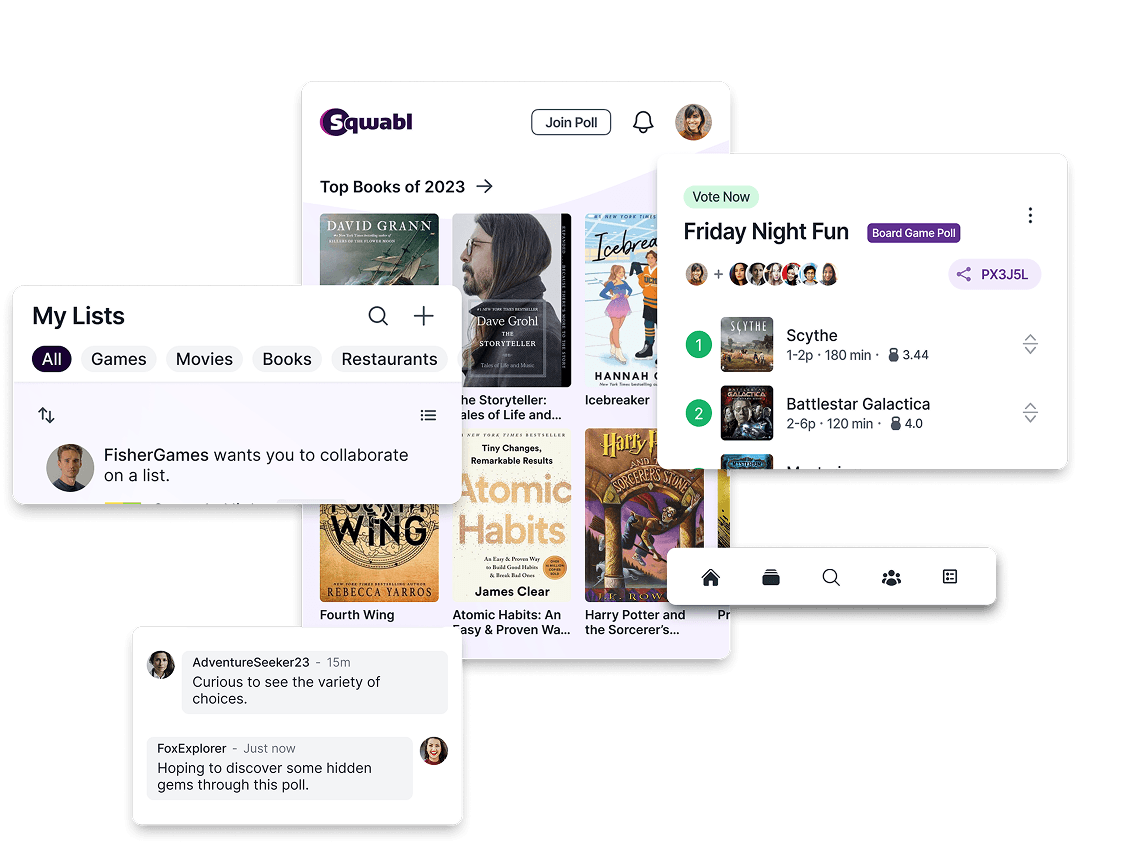
Rebuilt the voting flow around drag and drop after the tap-based version tested poorly in walkthroughs, and closed the gap between polling and social by folding chat into every list, poll, and group instead of bolting it on afterward.
Problem & Constraints
Funding + Budget Constraints
Evolving App Vision
Process & Key decisions
Groups struggle to make collective decisions efficiently. Without a dedicated tool, the process devolves into fragmented group chats, ignored messages, and unresolved choices. The challenge was to design an experience that made polling and group decision-making feel effortless and social, accessible enough for casual friend groups, but structured enough to actually reach a decision.
List Creation Flow
We redesigned the flow around a playlist-inspired model — familiar from apps like Spotify and Apple Music — allowing users to name their list, browse trending items, search by category, and build their collection incrementally.
This approach reduced the learning curve by grounding the experience in patterns users already understood making list creation feel immediate and intuitive rather than open-ended and unclear.


Voting Experience
We rebuilt the voting experience around a drag-and-drop interaction model making reordering feel physical and immediate. Clear directional prompts and simplified visual hierarchy were introduced to guide users through each step o the voting process. We also added collaborative features (including in-poll cha and poll scheduling), giving creators more tools to coordinate with their group.
This approach reduced the learning curve by grounding the experience in patterns users already understood making list creation feel immediate and intuitive rather than open-ended and unclear.
Drag and drop replaced tap-to-rank because tapping through a list of ten items to vote felt like filling out a form, not making a choice with friends. Reordering by hand made the vote feel like something happening in the moment rather than a task to get through. I paired that with in-poll chat and scheduling so a group could argue about the pizza order without leaving the poll to do it in a separate thread.

Expanded Social Feature
Early MVP scoping had prioritized the core polling mechanic, leaving social connectivity as a secondary concern. As the product vision matured, it became clear that without the ability to communicate and connect, users have no reason to stay in the app between votes.
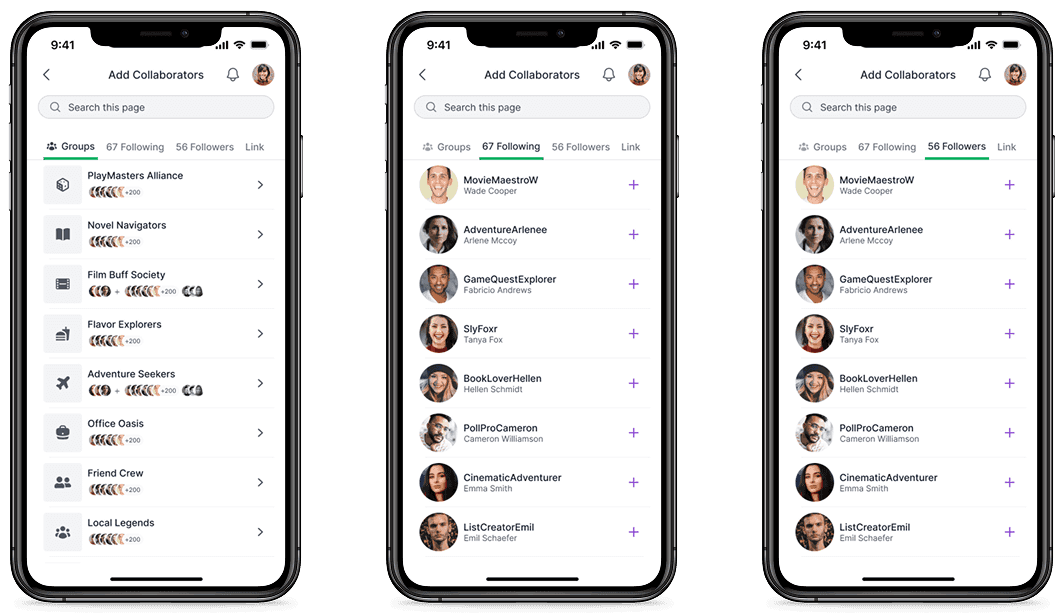
We designed and integrated contextual chat across Lists, Polls, and Groups, accessible via a floating chat button, so conversation was always one tap away without interrupting the experience. We also introduce Groups, following, and followers, weaving social interaction into every part of the app rather than treating it as separate feature.

Design System & Components
Before this project, the two design files in play used three different type scales and no shared spacing logic, which meant every new screen started from a guess. I built a token system for color, type, and spacing, then a component library on top of it covering buttons, cards, list items, and chat modules, roughly 40 components in total. Handoff time to the four-person dev team dropped from days of back-and-forth on spacing and states to a single review pass, since every component already documented its own variants.

Final Experience
Sqwabl launched on Android and iOS as a group decision tool built around lists people already know how to make. A user opens a poll, drags items into the order they want, and argues about it in the same screen instead of a separate group chat. The playlist-style list creation and the in-poll chat turned out to be the two features people used without needing an explanation, which was the whole bet behind the redesign.

Impact & Findings
Value of Established UI Patterns
Grounding new interactions in familiar models, like using Spotify's playlist structure as the foundation for list creation proved to be one of the most effective tools for reducing friction. When users already understand the pattern, the product feels intuitive from the first interaction.
Agile Adaptability
Frequent pivots, funding pauses, and shifting priorities meant restarting with renewed focus multiple times. I learned to re-establish context quickly, reprioritize without losing momentum, and deliver polished work even when the goalposts moved.
Flexible Validation
This project had no budget for formal usability testing, a common real-world constraint. In response, I leaned on competitive research, heuristic analysis, and internal walkthroughs to validate decisions and keep the work user-centered. It reinforced that good design thinking doesn't require a perfect process, it requires the right principles applied thoughtfully within whatever constraints exist.