
Clarity at scale
My Role
Lead UX/UI Designer
Platform(s)
Web
Timeline
Dec 2024 - Jan 2025
Team
2 Designers
TL;DR
Responsibilities
Led end-to-end UX for migrating from Power BI to a custom web-based diagnostic platform, covering research, IA, design systems, and handoff for both internal and future client-facing products.
Results
A fast and clean diagnostic experience with a purpose-built tool the Summit team can actually rely on. The foundation for a scalable client product is in place and ready to ship.
Highlights
Redesigned an enterprise diagnostic platform, creating a scalable design system for internal and client use. Focused on real workflows to drive adoption, positioning the product for a paid release without a rebuild.
Problem & Constraints

The reporting system buried the Summit team in steps. Diagnosing a client issue meant knowing which of several disconnected reports held the answer, then digging through it by hand. The data existed. It just never showed up where the person doing the diagnosis actually needed it. I also had to design for a second life this tool would eventually have: the same system, later, in front of paying clients, which meant every decision had to hold up outside the internal team that requested it.
Process & Key decisions
The project began with deep user research to understand how the Summit team navigates support calls, which led to structuring the tool around their diagnostic flow rather than the underlying data model. From there, the focus shifted to building trust through clear, confident data presentation and establishing a scalable design system suitable for client-facing use.
Dashboard
The goal was clarity at a glance, with depth one click away.
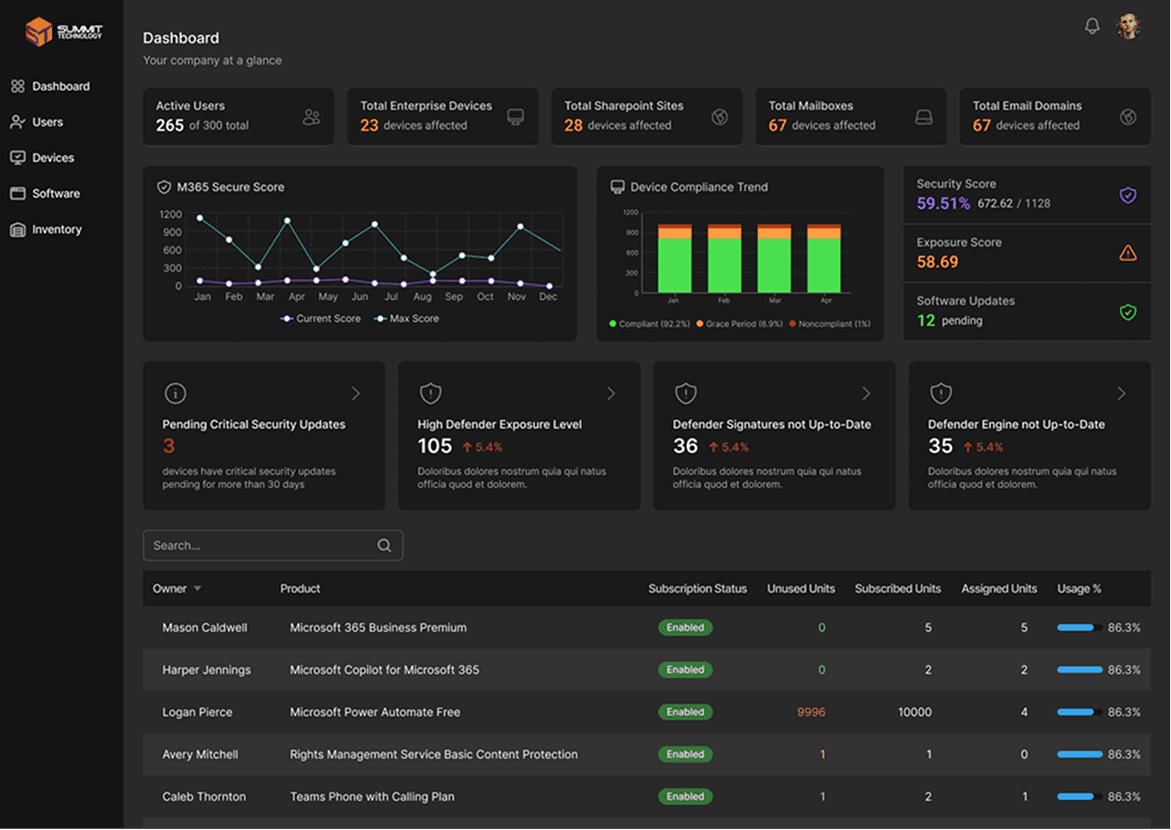
This is the entry point. It answers one question fast. Is this company healthy or not?
I combined security, device, and user data into a single view so teams don’t have to piece it together themselves. Key metrics like Defender status, exposure levels, update gaps, and device trends surface immediately.
From there, every data point is clickable. You can move from a high-level score straight into the exact devices or users causing the issue.

Device Exposure & Risk
This section is built for action.
Instead of listing issues, it prioritizes risk. High exposure devices and critical gaps surface first, with clear indicators of what’s wrong.
The insights panel calls out common failures like disabled firewalls or outdated signatures so teams don’t have to hunt for patterns.
A quick inventory view sits alongside it, giving immediate context. You can see the problem and the affected devices in the same moment.


Device Inventory
This is where teams go when they need detail.
I structured it to move from summary to identity. Start with overall stats, then narrow into specific users, devices, or applications.
Each identity view pulls everything into one place. Usage, authentication, group membership, and risk signals all live together.
No more switching tabs or tools just to understand one user.

Design System & Components
Building a tool this complex without a design system would have meant making the same decision dozens of times with slightly different answers each time. That's how inconsistency creeps in, and inconsistency in a diagnostic tool erodes trust fast.

I built a lightweight design system based on Tailwind to keep the app consistent as it grows, including support for light and dark mode.
To manage complex, data-heavy interfaces, I focused on a flexible set of reusable components, including tables, filters, stat blocks, and detail panels, all built on shared logic and interaction patterns.
This made the experience more predictable for users, faster to build for the team, and created a scalable foundation for the future client-facing version without redesigning core pieces.

Final Experience
What came out the other side is a tool that fits how Summit actually works. Open it, and you know where you stand, what needs attention, and where to go to fix it. The navigation follows the shape of a real support session: health overview first, risk areas next, specifics only when you need them, so context carries forward instead of resetting every time you move between screens. The same component system that runs the internal version is built to carry the client-facing release without a rebuild, which was the point of building it this way from day one.

Impact & Findings
drill-down workflows
Shifting from report browsing to guided drill-down cut the number of steps between opening the tool and finding a specific broken device, since the path now goes health score to risk area to device in three clicks instead of a search across separate reports.
internal adoption
The team started using the new dashboard for live support calls within the first week, faster adoption than a typical internal tool sees, because the interface followed workflows they already had instead of asking them to learn a new one.
The Next Step
The design system built for two months of internal use is the same one that will carry the client-facing release, which means the paid product ships on validated components instead of a second design pass.