
My Role
Lead UX/UI Designer
Platform(s)
Web
Timeline
Nov 2024 – Sep 2025
Team
2 Designers, 2 Developers
TL;DR
Responsibilities
UX audit, design leadership, design system creation, component architecture, feature design across pitch decks, messaging, and dashboard, and client advocacy.
Results
Volcanic Retail launched with a complete, cohesive product that gave retailers and brands a dedicated space to connect and transact.
Highlights
I inherited a partially built product and shipped a complete one, built the design system it never had, and turned an underused feature into the thing retailers and brands actually came back for.
Problem & Constraints

Volcanic Retail had a partially built web portal, designs that missed the mark, and most of the application still unbuilt. The UX wasn't landing for retailers or brands, since neither side could tell from the interface whether the platform would actually help them connect faster or close a deal with more confidence. There was no design system holding anything together. Components were inconsistent, the typography was hurting readability, and the product was too far from the finish line. They needed someone to take ownership, close the gaps, and ship something worth launching.
Does this help retailers and brands connect faster
and more confidently?
Process & Key decisions
I started with a UX audit to map what existed, what was broken, and what was missing entirely. From there, I pushed for changes that mattered, including a font upgrade that immediately improved readability, and led my team through building out the missing core of the product.
Pitch Decks
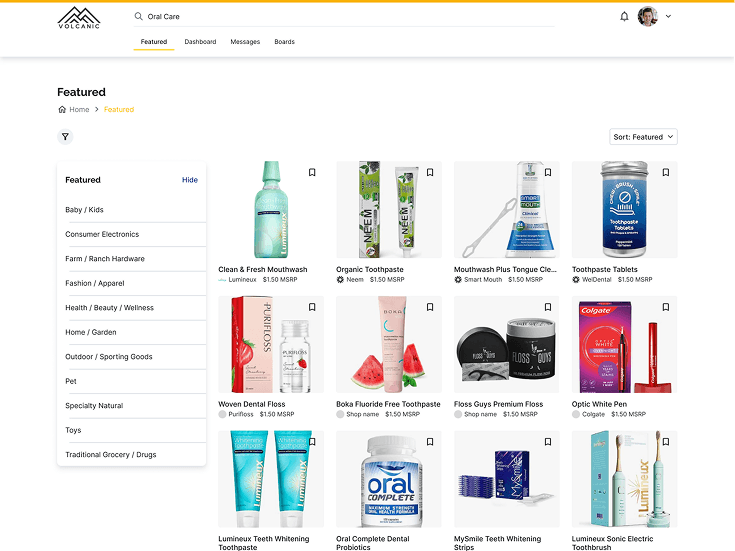
Volcanic had a "boards" feature where retailers could pin brands they liked. That was the spark. We reframed it entirely into pitch decks where brands could curate product information from their Volcanic catalog and send it directly to retailers. A passive discovery tool became an active sales channel.


Messaging
We built a full messaging system with inbox, search, labels, and filtering. Users can send attachments, share pitches inline, and multiple team members can participate in a single thread. No more back-and-forth outside the platform.
Dashboard
The dashboard was designed to reduce friction from the first login. Onboarding guides users to value immediately. From there, a single view surfaces sent pitches, active conversations, unread notifications, created pitch decks, and a full product table where brands can add and manage items for future pitches.

Design System & Components
There was no design system when I came in. Components had been built in isolation with three different button styles and no shared spacing logic, which meant every new screen started from scratch instead of from a pattern. I built a system on Tailwind with a defined token set for color, type, and spacing, then a component library covering roughly 35 components across the dashboard, messaging, and pitch deck flows. That gave the dev team something to build from with confidence instead of guessing at what "close enough" meant on any given screen.
Final Experience
What launched was a product that felt intentional. Retailers and brands had a shared space to discover, communicate, and close deals without ever leaving the platform. The interface was clean, the flows made sense, and the foundation was solid enough to grow on.



Impact & Findings
UX Audit
The UX audit surfaced gaps that, left unaddressed, would have stalled the launch entirely.
Repositioning
Repositioning "boards" as pitch decks transformed a passive feature into the product's most compelling differentiator.
Cut Inconsistencies
Building the design system mid-project paid off immediately, cutting component inconsistencies and giving the team a shared foundation to move faster.